Step-by-Step Guide
How to Create Your AI Avatar
Complete guide for creating a realistic digital twin
What is AI Avatar
AI Avatar is a digital twin — a realistic model of your face and voice that can speak, gesture, and create videos for you. To achieve the most natural result, we need your initial recording (reference video clip) to be of the highest quality possible. Based on it, AI will learn your movements, expressions, and speaking style.
What You'll Need
Phone or Camera
With good image quality (webcam is also an option)
🎙️ Quality Audio
Microphone or quiet place without noise
Good Lighting
Preferably natural, even light
2-3 Minutes of Time
To record quality reference video
Two Recording Methods
1. Upload Video File
Ideally from phone or camera in high quality
✅ Recommended for best results
2. Use Webcam
Quick and convenient solution directly from computer
Suitable for quick demo
💡 Recommendation: Video recorded on quality camera or new smartphone will provide much better results and more realistic avatar. We recommend 2-5 minutes of unedited recording (minimum 30 seconds) with professional camera or smartphone.
Examples of Correct and Incorrect Recording
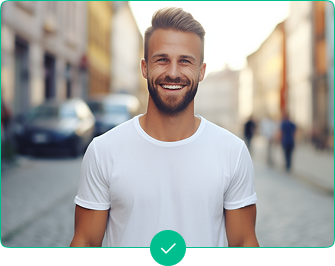
✅ Correct
- Good outdoor lighting
- Camera at eye level
- Direct look into camera
- Clean background, professional look
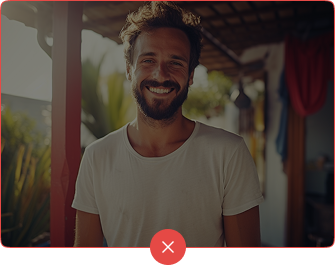
❌ Incorrect
- Dark environment, insufficient lighting
- Unnatural pose or angle
- Distracting background
- Poor image quality
Ready to Create Your AI Avatar?
Follow our guide and create a professional AI Avatar in minutes.
Try it on your own brand
A website address or a social profile is enough. We prepare the first 7 seconds of your video for free.